

Learn how to tackle server crashes and high traffic with PM2. Enhance Node.js apps effortlessly with process management, self-recovery, scaling, monitoring, and logging.
Meet Joe.
Joe is a Node.js developer who has just created an awesome web application. He hosted a virtual machine, started an app with node app.js, made himself a drink, and sat back to welcome the happy fans.
A few hours go by, and customers begin to complain. The server is no longer responding.
Joe opens up a VM, and Node.js is no longer running. No biggie: run node app.js again and the app is up and running again.
A few more hours go by and the same issue occurs again. It was all running well in localhost, but the high traffic is causing the server to behave unexpectedly in production. What can Joe do?
Enter PM2: the process manager for Node.js
Process managers enhance Node.js applications by allowing:
- Monitoring the running services locally and in production
- Running system administration tasks like starting and stopping applications without downtime
- Logging metrics
- Load balancing
Getting Started with PM2
To get started, create a simple server using Express.js.
npm init -y
npm install express
With basic packages set up, create an app.js file and paste the following code:
const app = require("express")();

app.get("/", (req, res) => {
  res.send("hello world");
});

app.listen(3000, () => {
  console.log("Server started on port 3000!");
});
PM2 is an NPM package installed globally on the system:
npm install -g pm2
pm2 start app.js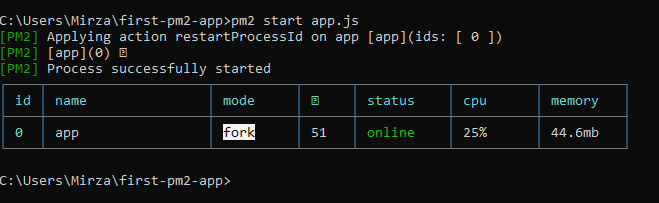
Notice that we do not get the log printed as would normally happen when running node app.js. Moreover, PM2 kicks us out of the long-running loop. If you go to localhost:3000, you can verify that the server is up.

The server is up and running in the back.
Process Management
PM2 lets you manually start, list, and stop active processes.
You can list out the running PM2 servers:
pm2 list
You can stop a single server:
pm2 stop app.js
pm2 stop 0
pm2 stop all
You can delete a saved server configuration:
pm2 delete app
pm2 delete 0
pm2 delete all
Just like with Nodemon, you can reload the server on changes:
pm2 start app.js --watchSelf-Recovery
Instead of running the Node.js application via node app.js, use pm2 start app.js. By running the app like this, PM2 will automatically recover the app from crashes. It automatically restarts the server if it fails.
Scaling and Load Balancing
By default, even if you are running the app on a multi-core CPU, Node.js runs an application on a single CPU core. If you have high traffic, all requests go to the single CPU instance while the rest are doing nothing.
The idea behind load balancing is to distribute the traffic across multiple cores:
- pm2 start app.js -i 2
- pm2 start app.js -i 4
- pm2 start app.js -i 8
- pm2 start app.js -i max
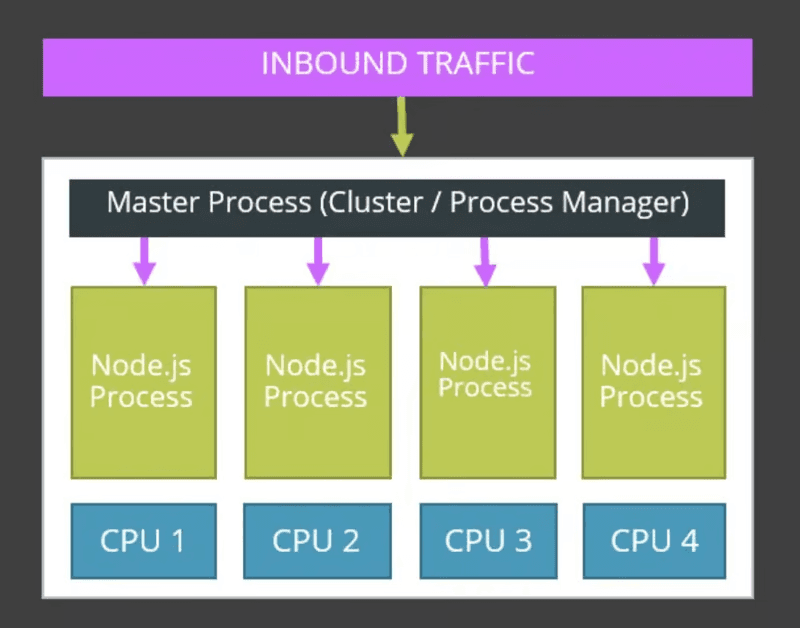
Node.js uses a specific pattern for load balancing, where all requests go to one core, and if it gets occupied, the requests are distributed to other cores. The result is an app that can handle large traffic.
Monitoring and Logging
Running pm2 monit app.js lets you monitor the stats of your application, including CPU and memory usage, and display logs in real time.
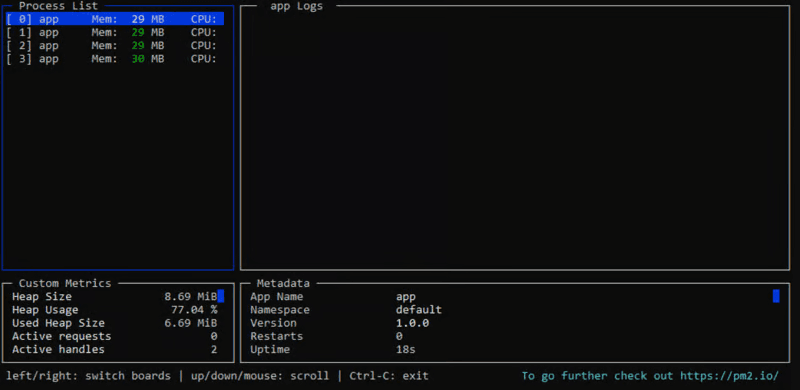
Additionally, you can display logs per process or application:
- pm2 logs processname
- pm2 logs app-name
PM2 Main App
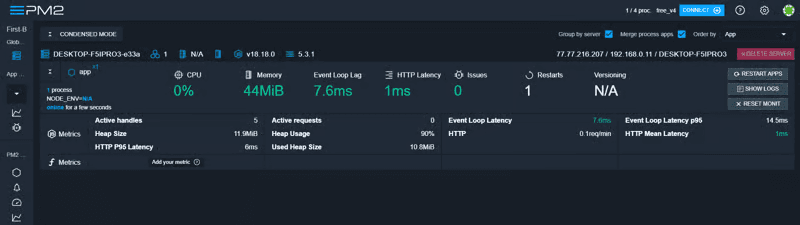
PM2 lets you monitor metrics on their main website.
Start by registering the app using the official PM2 guide. Once linked with the official PM2 Keymetrics site, you should see your app metrics displayed.
Final Words
PM2 is a powerful process manager that helps you orchestrate your applications using a few commands while you focus on building the product.